Using deken from within Pd
deken is a Pure Data's built-in package manager.
It can be used to install external libraries to enhance the functionality of Pd.
It is mainly targeted at Pd vanilla, but can be used with some other Pd flavours (like Plug Data as well.
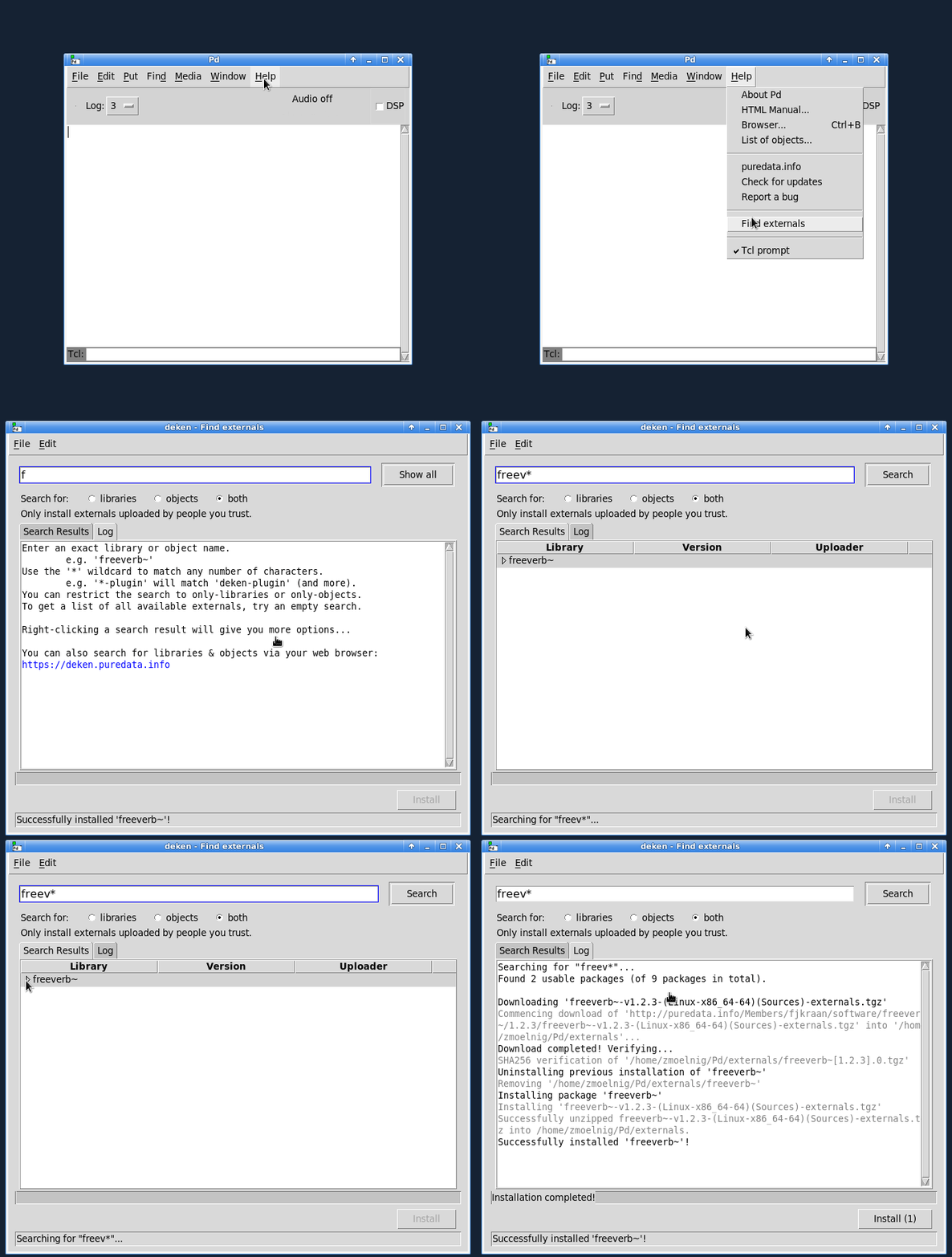
Open the package manager via the Tools menu's select Find externals entry.
You can type and search for a library name, an object name or both.
Searching
Any library which matches one (or more) words in the search field is returned.
E.g. searching for zexy gemh will return two results:
- the library
zexy(as the library name matches the first search wordzexy) - the library
Gem(as the library contains an object[gemhead]which matches the second search wordgemh)
Leaving the search field empty will return all available libraries.
Limiting search results
You can limit the search to only match libraries (but not object names), or vice versa.
E.g. selecting both (that is libraries and objects) and searching for the freeverb will return
- the
freeverb~library (as the library name matches) - the
freeverb~library (as the library contains an object[freeverb~]) - the
chairlibrary (containing an object[chair.vfreeverb~]) - the
ceammclibrary (containing[fx.freeverb~]and[fx.freeverb2~])
OTOH, selecting libraries (only) and searching for freeverb again
will only return the freeverb~ library.
You can also enable exact search, where a library or object name has to match exactly,
where freeverb~ will still match the freeverb~ library/object, but no longer chair.vfreeverb~ or fx.freeverb2~.
You can use the wildcards ? (matching exactly one character) and * (matching any number of characters (including none))
to further refine your search.
E.g. atan*~ will return all libraries containing objects that start with atan and end with ~
(like [atan~], [atan2~] and [atanh~]).
OTOH, atan?~will only return libraries containing objects like [atan2~] or [atanh~].
Libraries that only contain objects like [atan] (without a trailing ~) or [math.atanh~] (with leading math.)
will not be returned.
Incompatible and outdated libraries
By default, only libraries that are compatible with the running Pd are displayed. Also, only the latest matching version is shown.
If you are interested in older versions of libraries (or in libraries compiled for other systems), you can enable them via the preferences.
Installing packages
Once you are happy with the search results, select the libraries you want to install (by left-clicking them), and click the Install button.
This will download the selected packages, remove previous installations of the libraries (by deleting any folder named like the to-be-installed libraries), and install the new packages by unzipping them.
You can prevent the removal of old versions of the libraries via the preferences.
Trusting packages
Installing package files
You can also install previously downloaded deken packages (files ending with the .dek extension).
After opening the deken package manager, use the File menu's Install DEK file... entry.
Select the deken packge and install it.
Deken packages can be downloaded from the search results:
- Right click a search result
- Select
Copy package URLfrom the context menu - Open your favourite browser and copy the package URL from the clipboard
Alternatively, you can find and download packages via the webinterface.
Download/Install deken itself
Since Pd-0.47 (released in 2016)
the deken-plugin is included in Pure Data itself,
so the only reason to manually install it is to get the newest version.
Main development of the plugin is still happening in this repository, so you might want to manually install the plugin to help testing new features.
When manually installing the deken-plugin, Pd will use it if (and only if) it has a greater version number
than the one included in Pd.
In this case you will see something like the following in the Pd-console (you first have to raise the verbosity to Debug):
[deken]: installed version [0.2.1] < 0.2.3...overwriting!deken-plugin.tcl (Pd externals search) in /home/frobnozzel/.local/lib/pd/extra/deken-plugin/ loaded.
Updating deken
On any recent version of Pd (that already comes with deken included), you can
use Help -> Find Packages itself to search and install newer versions of the
plugin.
Just search for deken-plugin and install the latest and greatest release of the plugin.
For manual installation (e.g. because you want to test a developer version of the plugin), download the deken-plugin.tcl and save it to your Pd folder:
- Linux =
~/.local/lib/pd/extra/deken-plugin/(with Pd<0.47 try~/pd-externals/deken-plugin/) - OSX =
~/Library/Pd/deken-plugin/ - Windows =
%AppData%\Pd\deken-plugin\
Then select Help -> Find Packages and type the name of the external you would like to search for.