Deken Package Manager
deken is a Pure Data's built-in package manager.
It can be used to install external libraries to enhance the functionality of Pd.
While it is mainly targeted at Pd vanilla, it can be used with some other Pd flavours (like Plug Data as well.
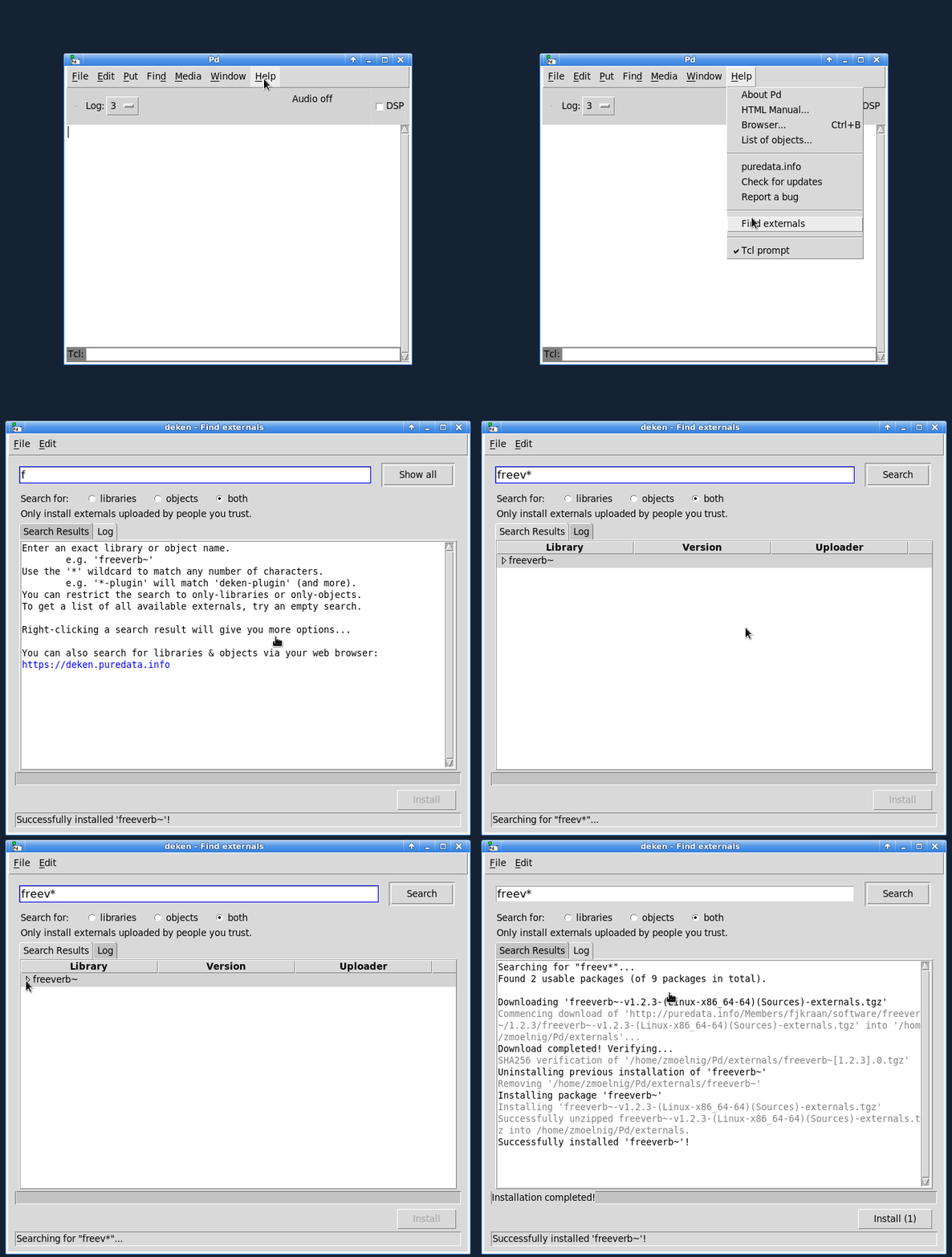
Packages are stored on http://puredata.info/ and can be installed using the Help -> Find Packages menu after installing the GUI plugin.
README.1st
Since Pd-0.47 (released in 2016)
the deken-plugin is included in Pure Data itself,
so the only reason to manually install it is to get the newest version.
Main development of the plugin is still happening in this repository, so you might want to manually install the plugin to help testing new features.
When manually installing the deken-plugin, Pd will use it if (and only if) it has a greater version number
than the one included in Pd.
In this case you will see something like the following in the Pd-console (you first have to raise the verbosity to Debug):
[deken]: installed version [0.2.1] < 0.2.3...overwriting!deken-plugin.tcl (Pd externals search) in /home/frobnozzel/.local/lib/pd/extra/deken-plugin/ loaded.
Download/Install
On any recent version of Pd (that already comes with deken included), you can
use Help -> Find Packages itself to search and install newer versions of the
plugin.
Just search for deken-plugin and install the latest and greatest release of the plugin.
For manual installation (e.g. because you want to test a developer version of the plugin), click to download deken-plugin.tcl and save it to your Pd folder:
- Linux =
~/.local/lib/pd/extra/deken-plugin/(with Pd<0.47 try~/pd-externals/deken-plugin/) - OSX =
~/Library/Pd/deken-plugin/ - Windows =
%AppData%\Pd\deken-plugin\
Then select Help -> Find Packages and type the name of the external you would like to search for.
Trusting packages
The deken-plugin will help you find and install Pd-libraries.
However, it does not verify whether a given package is downloaded from a trusted source or not.
As of now, the default package source is http://puredata.info.
Anybody who has an account on that website (currently that's a few thousand people) can upload packages,
that the deken-plugin will happily find and install for you.
In order to make these packages more trustworthy, we ask people to sign their uploaded packages with the GPG-key. Unfortunately the deken-plugin does not check these signatures yet. If you are concerned about the authenticity of a given download, you can check the GPG-signature manually, by following these steps:
- Navigate to
Help -> Find Packagesand search for an external - Right-Click one of the search results
- Select "Copy package URL" to copy the link to the downloadable file to your clipboard
- Download the package from the copied link
- Back in the deken search results, select "Copy OpenGPG signature URL"
- Download the GPG-signature from the copied link to the same location as the package
- Run
gpg --verifyon the downloaded file
If the signature is correct, you can decide yourself whether you actually trust the person who signed: - Do you trust the signature to be owned by the person? - Do you know the person? - Do you trust them enough to let them install arbitrary software on your machine?
Links
- Development: https://github.com/pure-data/deken
- Documentation: https://deken.readthedocs.io/
- Development: https://github.com/pure-data/deken/issues